learn_openpyxl
openpyxl - 6. Images and Drawings
6.1 Adding Images to Worksheets
Adding images to worksheets uses the openpyxl.drawing.image module, you need to indicate the path of your image file, support gif, jpeg and png formats.
If you don’t input the location of the image in worksheet, it’s by default from anchor = "A1", check source code for detail.
from openpyxl import Workbook
from openpyxl.drawing.image import Image

workbook = Workbook()
sheet = workbook.active

img = Image("my_image.jpg")

sheet.add_image(img, "B2")

workbook.save("image_sample.xlsx")
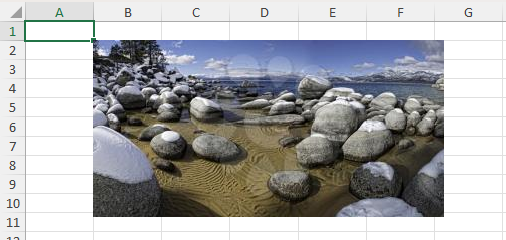
Image Source: https://clipart.com/
Source Code Reference:
drawing/image.py: https://foss.heptapod.net/openpyxl/openpyxl/-/blob/branch/default/openpyxl/drawing/image.py
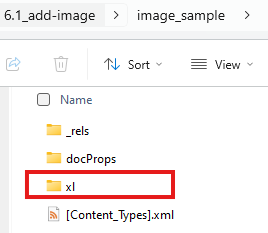
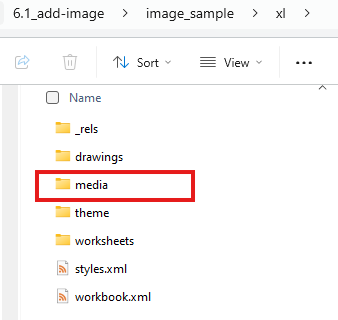
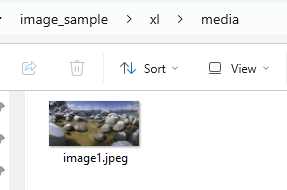
Extended information: treat xlsx as zip, you can extract the excel file after renaming its extension to zip, then following are the structure and we can see our image file is saved under the sub-folder:
| Level 1 | Level 2 | Level 3 |
|---|---|---|
 |
 |
 |
6.2 Working with Drawing Objects
Images and other drawing objects in openpyxl are represented as Drawing objects.
Source Code Reference:
drawing/drawing.py: https://foss.heptapod.net/openpyxl/openpyxl/-/blob/branch/default/openpyxl/drawing/drawing.py
6.3 Resizing and Positioning Images
from openpyxl import Workbook
from openpyxl.drawing.image import Image
from openpyxl.utils.units import pixels_to_EMU

workbook = Workbook()
sheet = workbook.active

img = Image("my_image.jpg")
drawing = sheet.add_image(img, "B2")

# Resizing the image (in EMUs)
img.width= 200
img.height = 150

# Reposition the image (in EMUs) ?
img.left= pixels_to_EMU(500)
img.top = pixels_to_EMU(50)

workbook.save("drawing_sample.xlsx")
Source Code Reference:
pixels_to_EMU: https://foss.heptapod.net/openpyxl/openpyxl/-/blob/branch/default/openpyxl/utils/units.py#L62
Open Questions:
- The
widthandheightproperties are not to drawing object, but toImageobject - No effect of
leftandtopproperty during testing.
6.4 Image Formats
openpyxl supports various image formats, including PNG, JPEG, GIF, and others. The specific formats supported depend on the underlying libraries used by openpyxl (usually Pillow). If you encounter issues with a specific format, check your Pillow installation and ensure it supports that format. PNG is generally recommended for lossless image quality.
Last Updated at: 1/2/2026, 10:20:42 AM