ArchiSurance_Practice
🏛️ ArchiSurance Mastery: Hands-on ArchiMate Practice





The ultimate hands-on tutorial for aspiring Enterprise Architects. This repository provides a complete ArchiMate implementation of the famous ArchiSurance case study, specifically designed for candidates preparing for the ArchiMate® Practitioner (Level 2) Certification Exam.
🎯 Why This Repository?
Theory is one thing; application is another. To pass the ArchiMate Practitioner exam, you must understand how to apply the language to complex, real-world scenarios.
ArchiSurance is the official case study used by The Open Group. This repository transforms that case study into a “Hands-on Lab,” allowing you to explore, modify, and learn the relationships between Business, Application, and Technology layers.
✅ Key Learning Objectives:
- Layer Interaction: Master how the Business Layer drives Application requirements.
- Cross-Layer Mapping: Understand the derivation of relationships (Serving, Realization, Assignment).
- Strategy & Motivation: Learn to model Drivers, Goals, and Outcomes (crucial for Level 2).
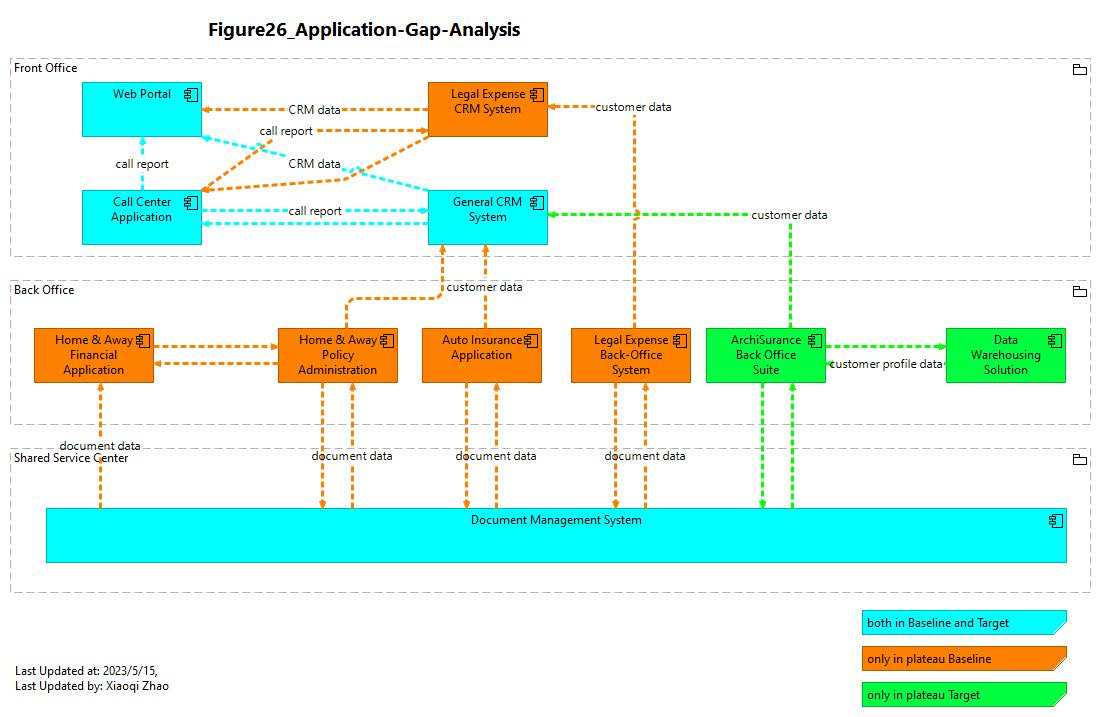
- Implementation & Migration: Practice Gaps, Plateaus, and Work Packages for transition planning.
📂 Repository Structure
The models are organized to follow the standard ArchiSurance transformation journey:
| Folder / File | Description | ArchiMate Focus |
|---|---|---|
📦 ArchiSurance_Full_Model.archimate |
The complete, end-to-end model. | All Layers |
📁 Phase A - Architecture Vision |
Stakeholder analysis and drivers for change. | Strategy & Motivation |
📁 Phase B - Business Architecture |
Business processes, functions, and actors. | Business Architecture |
📁 Phase C1 - IS Architecture - Application |
Component realization and service exchange. | Information Systems - Application Oriented |
📁 Phase C1 - IS Architecture - Data |
Component realization and service exchange. | Information Systems - Data Oriented |
📁 Phase D - Technology Architecture |
Infrastructure, Nodes, and System Software. | Technology Architecture |
📁 Phase E&F - Opportunity Solution and Migration Planning |
Roadmap from Baseline to Target architecture. | Implementation & Migration |
🚀 Getting Started (Hands-on Practice)
To get the most out of this practice guide, follow these steps:
- Install Archi: Download the latest version of Archi, the industry-standard open-source modeling tool.
- Clone the Repo:
git clone [https://github.com/yasenstar/ArchiSurance_Practice.git](https://github.com/yasenstar/ArchiSurance_Practice.git) - Open the Model: Launch Archi and open the
.archimatefile. - Reverse Engineer: Look at a view (e.g., “Business Process View”) and try to recreate it from scratch using the ArchiSurance case study PDF (not included, available via The Open Group).
🏆 Exam Preparation Tips (Level 2)
This repository emphasizes the areas most likely to appear on the ArchiMate Practitioner Exam:
- Relationship Strength: Understand why a Realization is used over an Assignment.
- Grouping vs. Composition: Learn when to use structural vs. grouping elements.
- Derived Relationships: Practice the “short-cut” rules for complex paths.
- Viewpoint Choice: Learn which viewpoint is best for specific stakeholders (e.g., Layered Viewpoint vs. Application Usage Viewpoint).
🖼️ Preview
🎓 Master ArchiMate with Top-Rated Training
This repository is the official companion to my globally recognized ArchiMate training series. Whether you want a guided deep-dive or free community resources, these links are the best place to start:
⭐ [Bestseller] ArchiMate Modeling Practices with ArchiSurance
This course is a long-standing Bestseller on Udemy and has been officially selected for Udemy Business, reflecting its high quality and trust among global enterprises. It is specifically designed to help you bridge the gap between Level 1 theory and Level 2 practical application.
📺 Free Community Sharing (YouTube)
I believe in giving back to the ArchiMate modeling community. You can access a dedicated playlist of tutorials for free to get started with the ArchiSurance case study.
🎯 Why This Practice Lab?
To pass the ArchiMate Practitioner exam, you don’t just need to know the definitions—you need to know how to model. ArchiSurance is the official case study used by The Open Group, and this repository provides the “Digital Twin” of that case study.
Key Features:
- Level 2 Exam Focus: Heavy emphasis on the Motivation, Strategy, and Implementation & Migration layers.
- Relationship Mastery: Hands-on examples of derived relationships and complex cross-layer mapping.
- Real-World Scenarios: From baseline architecture to target state plateaus.
🛠️ Requirements
- The Archi Tool: You will need Archi (the leading open-source ArchiMate modeling tool) to open the
.archimatefiles. - Case Study Document: It is recommended to have the ArchiSurance Case Study PDF (from The Open Group) open as you explore these models.
🤝 Contributing & Community
Contributions are welcome! If you find a relationship that could be modeled more efficiently or want to add a new viewpoint (e.g., Security or Data), feel free to:
- Fork the Project.
- Create your Feature Branch.
- Commit your Changes.
- Open a Pull Request.
⭐ Support
If this repository helps you on your path to becoming a certified ArchiMate Practitioner, please give it a ⭐! It helps others find this resource.
Disclaimer: ArchiMate® is a registered trademark of The Open Group. This repository is a community-driven practice guide and is not officially affiliated with The Open Group.